There have been some significant changes in the world of OpenEXR this year, so it's time to incorporate some of them into ProEXR. The changes are big enough that I felt it best to release 1.9 in beta form and leave ample time for testing and feedback. Download links and more details after the jump.
Showing posts with label ProEXR. Show all posts
Showing posts with label ProEXR. Show all posts
Tuesday, December 17, 2013


Thursday, April 4, 2013
ProEXR 1.8
Eagle-eyed Adobe watchers who have read through the list of features in the next version of After Effects have seen that it will include version 1.8 of the ProEXR plug-ins. Yes, such a thing does exist, and I'm releasing it today. The next AE may not ship for a little while, but you can grab these plug-ins now and use them in whichever version you've got, all the way back to CS3.
This is a modest release, befitting a 0.1 version upgrade. The flashiest new feature is found in After Effects, something called channel caching. The quick explanation is that an EXR with many channels will read much faster if you turn it on (go to the Interpret Footage dialog and click the More Options button). More details in this blog post.
 Version 1.8 also contains a year's worth of minor bug fixes, optimizations, and other improvements to all the plug-ins in ProEXR. And yet they are completely compatible with the previous versions, so fear not.
The update is free, as always. I recommend you upgrade ASAP.
Enjoy!
This is a modest release, befitting a 0.1 version upgrade. The flashiest new feature is found in After Effects, something called channel caching. The quick explanation is that an EXR with many channels will read much faster if you turn it on (go to the Interpret Footage dialog and click the More Options button). More details in this blog post.

The update is free, as always. I recommend you upgrade ASAP.
Enjoy!
Monday, June 4, 2012
dataWindow and displayWindow in OpenEXR files
All OpenEXR files contain two required attributes, dataWindow and displayWindow. Each gives the coordinates for a rectangle, the former describing the pixels stored in the file and the latter describing the viewer that the pixel data lives in. You can see these and other OpenEXR file attributes by viewing the ProEXR File Description in Photoshop.
For a standard OpenEXR file (including all files written by the ProEXR plug-ins), the dataWindow and displayWindow are the same, so you simply have pixels filling the view as you would for regular image files like JPEG or PNG.
But in some cases the dataWindow and the displayWindow may not match. For example, a 3D program with only a small object in the middle of frame might only have to store a 400x400 image within a full 1920x1080 frame, so the dataWindow will be smaller than the displayWindow.

Or an image may be rendered overscan, with pixels that stretch beyond the area you normally view. These pixels might be used if camera shake is added or to provide real edge pixels to use if the image is blurred. So you could have a 2120x1280 image and a 1920x1080 view.
 (images borrowed from the Technical Introduction to OpenEXR on OpenEXR.com)
Neither Photoshop nor After Effects have the notion of a display window from the perspective of a file importer, so ProEXR always reads in the full dataWindow, giving you access to all the pixels in the file. But once the file is imported, you can match the displayWindow by floating the Photoshop or After Effects layer inside a differently sized comp. ProEXR includes a Photoshop script and an After Effects plug-in to do the math for you and set this up automatically and precisely.
In Photoshop, run the "ProEXR displayWindow" script, included with ProEXR. It will scan the ProEXR File Description for the window data and automatically enter it into the dialog for you. If you have this information through some other method, you can enter it manually. When you click OK, the Photoshop canvas will be resized so that the original layer floats properly within it, all the original pixels maintained.

In After Effects with the ProEXR AE plug-in installed, select the EXR file and run File > Create ProEXR Layer Comps. In addition to everything this command usually does, a "display comp" will be created that matches the displayWindow and contains the assemble comp floating within it. A display comp will only be created if the displayWindow is different from the dataWindow.

If you have an image sequence in After Effects where the dataWindow changes every frame (perhaps because a small object is being animated), this presents a problem for After Effects, which usually expects every image in a sequence to be the same size. The easiest thing to do is force your renderer to store the whole frame if possible. Otherwise, the way to deal with it is to import the sequence as individual files—select all the files and uncheck the "OpenEXR Sequence" checkbox in the Import Dialog. Then select all these files in your project, hold down option/alt, and go back to the Comp Creator command which will now be renamed "ProEXR DisplayWindow Comp". The result will be a comp with all the files lined up in time, placed inside the comp appropriately. Use this comp as you would a piece of footage.
Update: ProEXR 1.9 for After Effects will handle displayWindow for you without using the Comp Creator.
If you'd like a sample of displayWindow behavior to experiment with, download the file at the bottom of the fnord OpenEXR page.
For a standard OpenEXR file (including all files written by the ProEXR plug-ins), the dataWindow and displayWindow are the same, so you simply have pixels filling the view as you would for regular image files like JPEG or PNG.
But in some cases the dataWindow and the displayWindow may not match. For example, a 3D program with only a small object in the middle of frame might only have to store a 400x400 image within a full 1920x1080 frame, so the dataWindow will be smaller than the displayWindow.

Or an image may be rendered overscan, with pixels that stretch beyond the area you normally view. These pixels might be used if camera shake is added or to provide real edge pixels to use if the image is blurred. So you could have a 2120x1280 image and a 1920x1080 view.
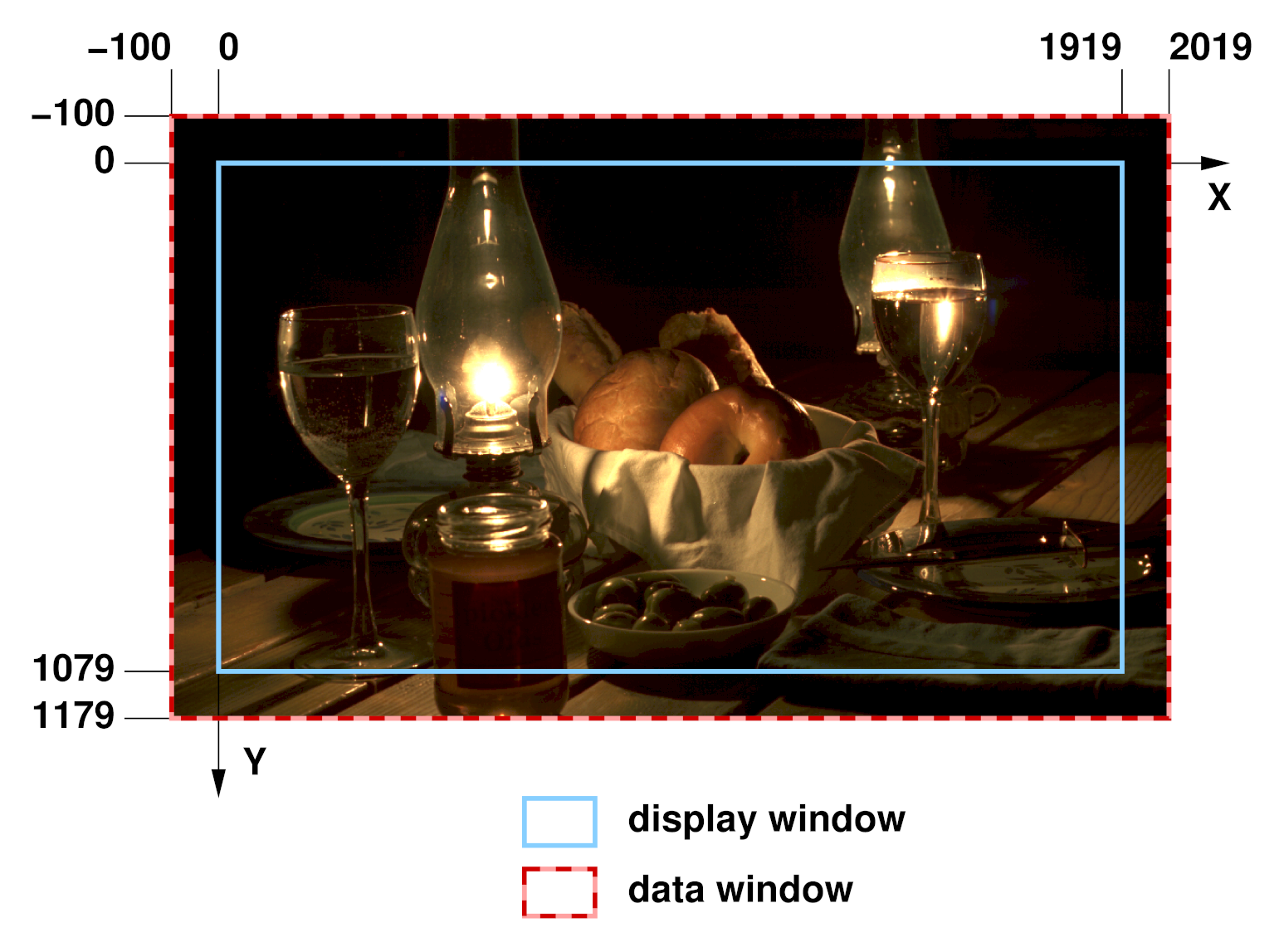
Neither Photoshop nor After Effects have the notion of a display window from the perspective of a file importer, so ProEXR always reads in the full dataWindow, giving you access to all the pixels in the file. But once the file is imported, you can match the displayWindow by floating the Photoshop or After Effects layer inside a differently sized comp. ProEXR includes a Photoshop script and an After Effects plug-in to do the math for you and set this up automatically and precisely.
In Photoshop, run the "ProEXR displayWindow" script, included with ProEXR. It will scan the ProEXR File Description for the window data and automatically enter it into the dialog for you. If you have this information through some other method, you can enter it manually. When you click OK, the Photoshop canvas will be resized so that the original layer floats properly within it, all the original pixels maintained.

In After Effects with the ProEXR AE plug-in installed, select the EXR file and run File > Create ProEXR Layer Comps. In addition to everything this command usually does, a "display comp" will be created that matches the displayWindow and contains the assemble comp floating within it. A display comp will only be created if the displayWindow is different from the dataWindow.
If you have an image sequence in After Effects where the dataWindow changes every frame (perhaps because a small object is being animated), this presents a problem for After Effects, which usually expects every image in a sequence to be the same size. The easiest thing to do is force your renderer to store the whole frame if possible. Otherwise, the way to deal with it is to import the sequence as individual files—select all the files and uncheck the "OpenEXR Sequence" checkbox in the Import Dialog. Then select all these files in your project, hold down option/alt, and go back to the Comp Creator command which will now be renamed "ProEXR DisplayWindow Comp". The result will be a comp with all the files lined up in time, placed inside the comp appropriately. Use this comp as you would a piece of footage.
Update: ProEXR 1.9 for After Effects will handle displayWindow for you without using the Comp Creator.
If you'd like a sample of displayWindow behavior to experiment with, download the file at the bottom of the fnord OpenEXR page.
Thursday, April 26, 2012
ProEXR 1.7 available
Another six months, another two seasons, and another free 0.1 update to ProEXR. Version 1.7 includes some pretty nifty improvements and additions. They are:
1. Premiere Pro plug-in
OpenEXR is beginning to spread beyond the rarified world of 3D rendering and digital compositing. More and more it is being used to send images between editing software and color correction tools, and OpenEXR is also the foundation for the upcoming ACES digital cinema workflow. ProEXR for Premiere lets you import and export OpenEXR sequences in Premiere Pro. It supports timecode, all the EXR compression options, and takes advantage of Premiere's native floating point pipeline.
2. After Effects performance boost
More work has been put into getting performance gains out of the AE plug-ins. In some tests, the new plug-ins are twice as fast as what was released in version 1.6, which was already an improvement over 1.5, the version currently shipping in After Effects. The new OpenEXR, EXtractoR, and IDentifier plug-ins are project-compatible and free, so don't waste any time replacing your current After Effects versions with the latest and greatest.
3. ProEXR EZ is free
No longer be held captive by fnord software's greedy capitalists! More information below.
4. VRimg support
Many VRay users convert their multipass VRimg files to OpenEXR and then open them with ProEXR. Now they can skip a step and open VRimg files directly in Photoshop and After Effects. (Both programs prefer you use the 3-letter file extension ".vri" instead of ".vrimg".)
Enjoy!
1. Premiere Pro plug-in
OpenEXR is beginning to spread beyond the rarified world of 3D rendering and digital compositing. More and more it is being used to send images between editing software and color correction tools, and OpenEXR is also the foundation for the upcoming ACES digital cinema workflow. ProEXR for Premiere lets you import and export OpenEXR sequences in Premiere Pro. It supports timecode, all the EXR compression options, and takes advantage of Premiere's native floating point pipeline.
2. After Effects performance boost
More work has been put into getting performance gains out of the AE plug-ins. In some tests, the new plug-ins are twice as fast as what was released in version 1.6, which was already an improvement over 1.5, the version currently shipping in After Effects. The new OpenEXR, EXtractoR, and IDentifier plug-ins are project-compatible and free, so don't waste any time replacing your current After Effects versions with the latest and greatest.
3. ProEXR EZ is free
No longer be held captive by fnord software's greedy capitalists! More information below.
4. VRimg support
Many VRay users convert their multipass VRimg files to OpenEXR and then open them with ProEXR. Now they can skip a step and open VRimg files directly in Photoshop and After Effects. (Both programs prefer you use the 3-letter file extension ".vri" instead of ".vrimg".)
Enjoy!
ProEXR EZ is Free
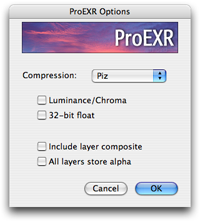
A fact of life for plug-in developers is that a good idea for a plug-in today may become a new feature in the main program tomorrow. If you have saved an OpenEXR file out of the Photoshop CS6 public beta, you will have seen this dialog:


As a refresher, the following plug-ins are free in ProEXR:

Which might remind you of another dialog:

So thank you, Adobe, I'm glad that you decided to give Photoshop users some more options for saving EXR files. And I'm glad I could help them out in the meantime with ProEXR EZ, which I'm now making free. Download ProEXR 1.7 and run ProEXR EZ without a serial number, even in versions of Photoshop prior to CS6.
But even if you're using CS6 and don't need to read or write multi-channel EXR files, you'll still want to use ProEXR EZ instead of Photoshop's built-in OpenEXR module. Our plug-in has these advantages:
- Photoshop's input options dialog comes up every time, while ProEXR EZ's only comes up if you hold down the shift key. You can also set a preference to make it come up every time if you want and set your own default settings.
- ProEXR EZ lets you write Luminance/Chroma images, while Photoshop can only read them.
- ProEXR EZ let you write files with Zip16, B44, and B44A compression, which Photoshop has left out for some reason.
- ProEXR lets you write out files in 32-bit float for the rare time when EXR's 16-bit float is not enough.
- ProEXR EZ includes the ProEXR File Description that tells you about all the channels and metadata in the EXR file you're using.
- ProEXR EZ reads and writes EXR color space information while Photoshop does not.
As a refresher, the following plug-ins are free in ProEXR:
- ProEXR EZ for Photoshop
- OpenEXR, EXtractoR, IDentifier plug-ins for After Effects
- OpenEXR for Premiere
- ProEXR Comp Creator for After Effects (part of ProEXR AE)
- ProEXR for Photoshop (read/write layered EXR files)
- ProEXR AE (write layered EXR files out of After Effects)
- VRimg support (part of ProEXR for Photoshop and ProEXR AE)
Thursday, October 27, 2011
ProEXR 1.6 released
A modest 0.1 version increase for a pretty significant update to ProEXR. It includes, of course, any number of minor bug fixes, but also a few pretty significant features. The update is free, as usual.
 1. Nuke Comp Builder script
Since the beginning, files saved with ProEXR in Photoshop have contained a little blurb of data detailing the layer arrangement, transfer modes, and other things beyond the scope of the EXR format. ProEXR for Photoshop and After Effects could use this data to rebuild their project exactly as it was saved, but for Nuke you were forced to do it manually. Well, no longer—ProEXR includes a Python script that will read the data (requires Nuke 6.3) and build a comp for you. Linux users, download it here.
2. AE plug-in optimizations
A significant amount of work was put into the After Effects plug-ins to try to eke more speed out of them, particularly when reading layers using EXtractoR. I won't bore you with the details, but in some tests I've seen a 40% improvement. Feel free to swap these in for the ones that ship with AE. Don't worry, they're 100% project compatible with the previous versions you've already been using.
3. Memory Mapping
A new option has been added when reading files: "Memory Mapping." What this means is that the entire raw EXR file is loaded into a memory buffer before it is decompressed. Some users have found that performing one big read can speed things up tremendously on certain networks. Access this option from the input options dialog in Photoshop, or it can be set by editing the Preferences file in AE. More details in the manual.
4. Render layered EXR files from After Effects
This feature merits its own blog post, don't you think?

Since the beginning, files saved with ProEXR in Photoshop have contained a little blurb of data detailing the layer arrangement, transfer modes, and other things beyond the scope of the EXR format. ProEXR for Photoshop and After Effects could use this data to rebuild their project exactly as it was saved, but for Nuke you were forced to do it manually. Well, no longer—ProEXR includes a Python script that will read the data (requires Nuke 6.3) and build a comp for you. Linux users, download it here.
2. AE plug-in optimizations
A significant amount of work was put into the After Effects plug-ins to try to eke more speed out of them, particularly when reading layers using EXtractoR. I won't bore you with the details, but in some tests I've seen a 40% improvement. Feel free to swap these in for the ones that ship with AE. Don't worry, they're 100% project compatible with the previous versions you've already been using.
3. Memory Mapping
A new option has been added when reading files: "Memory Mapping." What this means is that the entire raw EXR file is loaded into a memory buffer before it is decompressed. Some users have found that performing one big read can speed things up tremendously on certain networks. Access this option from the input options dialog in Photoshop, or it can be set by editing the Preferences file in AE. More details in the manual.
4. Render layered EXR files from After Effects
This feature merits its own blog post, don't you think?
ProEXR AE
New in version 1.6 of ProEXR is a new plug-in for After Effects: ProEXR AE. On one hand, this is the old ProEXR Comp Creator plug-in with a new name. But installing this plug-in also will add an extra option to your list of output formats.

Funny how sometimes one tiny little UI widget can indicate a whole world of possibilities. Yes, ladies and gentlemen, choosing "ProEXR Layers Sequence" will render all the layers of your After Effects comp into a multi-channel OpenEXR sequence. And of course each file will include our blob of layer data so it can be reconstructed in Nuke, Photoshop, or even back in AE.
Needless to say, this is somewhat beyond the scope of a typical After Effects file module, so perhaps it should be considered experimental for now. If it behaves oddly, please send email telling me so. And do remember that it follows the same layer naming conventions followed by the Photoshop plug-in (more on that in the manual).
To take advantage of this functionality, you'll need a ProEXR serial number. (It will run in trial mode for 15 days, like the Photoshop plug-ins.) You do not need a serial number to use the comp building functionality however.
Enjoy!
Funny how sometimes one tiny little UI widget can indicate a whole world of possibilities. Yes, ladies and gentlemen, choosing "ProEXR Layers Sequence" will render all the layers of your After Effects comp into a multi-channel OpenEXR sequence. And of course each file will include our blob of layer data so it can be reconstructed in Nuke, Photoshop, or even back in AE.
Needless to say, this is somewhat beyond the scope of a typical After Effects file module, so perhaps it should be considered experimental for now. If it behaves oddly, please send email telling me so. And do remember that it follows the same layer naming conventions followed by the Photoshop plug-in (more on that in the manual).
To take advantage of this functionality, you'll need a ProEXR serial number. (It will run in trial mode for 15 days, like the Photoshop plug-ins.) You do not need a serial number to use the comp building functionality however.
Enjoy!
Friday, October 14, 2011
OpenEXR command line tools
Eagle-eyed visitors to the fnord OpenEXR page may have noticed that there's been links to the OpenEXR utilities for a while. These are programs that are included with OpenEXR in source code form, but unless you're a programmer you probably haven't been able to use them. Heck, even if you are a programmer you may not have bothered to build them, as doing so involves building FLTK, downloading the nVidia Cg Toolkit, and other chores. So I've done the work for you and posted the result.
There are some useful tools in here. For the reference implementation to see how an EXR should look, use exrdisplay. Or playexr can play back an EXR sequence in real time and let you adjust exposure on the fly. Another favorite is exrmaketiled for converting a regular scanline EXR into a tiled, mipmapped image for the benefit of a 3D program that can take advantage.
As I said, these were written by Florian Kainz and his team at ILM, not me. I'm just posting the binaries to give more people access to them. They are all run from a command shell, so time to get comfortable with it if you haven't already. I've just got Mac and Windows versions here—I figure you Linux hackers can handle building them on your own. Enjoy!
Download
Mac | Win
There are some useful tools in here. For the reference implementation to see how an EXR should look, use exrdisplay. Or playexr can play back an EXR sequence in real time and let you adjust exposure on the fly. Another favorite is exrmaketiled for converting a regular scanline EXR into a tiled, mipmapped image for the benefit of a 3D program that can take advantage.
As I said, these were written by Florian Kainz and his team at ILM, not me. I'm just posting the binaries to give more people access to them. They are all run from a command shell, so time to get comfortable with it if you haven't already. I've just got Mac and Windows versions here—I figure you Linux hackers can handle building them on your own. Enjoy!
Download
Mac | Win
Tuesday, May 18, 2010
ProEXR 1.5 released

Now that Adobe has shipped Photoshop and After Effects CS5, it's time for ProEXR to join the party. Available now is version 1.5, complete with 64-bit versions for Mac and Windows. In fact, the Photoshop plug-in has been rewritten from the ground up to take full advantage of all the memory you can throw at it and load those giant EXRs as fast as I know how. As usual, this update is free.
After Effects CS5 ships with 1.5 pre-installed (shout out to my Adobe pals!) and CS3/4 users can update their plug-ins with 32-bit versions, also included.
But wait, there's more. Also included is ProEXR EZ for those Photoshop users who wanted extra alpha control but less multi-layer confusion. Not to mention countless small improvements and optimizations.
Enjoy!
Thursday, December 31, 2009
ProEXR 1.5 Beta
Well, 2009 was quite a year. Just before it's over, we have a public beta of ProEXR for Photoshop to try out here.
It's been completely re-written to read and write EXRs as fast as possible, taking advantage of all the memory you've got on your system (including you 64-bit Windows users).
There's also a new "ProEXR EZ" plug-in for people who find the whole multi-layer EXR thing a little overwhelming but want the extra control ProEXR gives you over alpha channels. ProEXR EZ even lets you put the Alpha in the Channels palette, if that floats your boat.
Most users will want to have either regular ProEXR or ProEXR EZ installed, not both. But if you do install both and open a file, ProEXR will be used unless you force EZ in Photoshop's Open dialog. When saving, you can easily pick one or the other.
Please send in bug reports and comments so we can make this the most solid release yet!
Wednesday, October 1, 2008
ProEXR ships with After Effects CS4

OK people, this is big, real big.
It's been officially announced: the free OpenEXR plug-ins I've been shipping for over a year are now going to be appearing in the next version of After Effects! So no longer will you have to replace Adobe's plug-in with the fnord one, because they will be the same! EXtractoR and IDentifier will also be included. You can read more about it here, here, here, and here.
And since you asked, yes, they will be remaining open source, and yes, I will continue to update them on the fnord web site as necessary.
Not included in After Effects will be the Comp Creator, which you can still download. And of course, the ProEXR Photoshop plug-in is separate.
This is really a big honor, and I want to thank the AE team for making it happen. I have had a love affair with After Effects for many years and it's hard to believe my plug-ins are now a part of it. Pinch me!
Update: See my credit in the AE secret about box (hold down option/alt while doing About After Effects). Whee!

Friday, September 12, 2008
ProEXR 1.3 released
A new version of ProEXR is available, adding a key feature that has been requested by users. Whereas the Photoshop plug-in already had a mechanism for effecting the way alpha channels were handled, we've now bumped the feature out of Easter Egg land and into legitimacy via a shiny new dialog.

The dialog does not appear by default. As before, you access the feature by holding down the option (Mac) or alt (Win) key. But now the settings are made clear as day and you can change the defaults to whatever you like. You can even make the dialog appear every time if you crave more modal UI interaction than you're currently getting.
ProEXR 1.3 also includes a variety of other small fixes. Needless to say, we recommend everyone switch to it (without any upgrade fee, of course). Enjoy!
Monday, November 12, 2007
ProEXR is a CS3 Essential
In the November issue of DV, Ned Soltz lists ProEXR as one of the "Ten Essential Photoshop CS3 Plug-Ins." Got that right…I mean…thanks!
Writing in the Instant Expert column, he calls it an "important acquisition for those who regularly go between PS and AE." How nice of him! If you're not a DV subscriber, you can currently view a PDF version of the article here.
Friday, November 2, 2007
ProEXR 1.2 released
I've posted an update to ProEXR. There are a number of small improvements in this version, mostly based on user requests and bug reports.
One feature I'll mention is that ProEXR is now saving more of the standard EXR metadata in files it creates. Information such as the user and computer name is being stored, which can be particularly useful for people with render farms trying to track down the source of a bad frame. In After Effects, the project and comp used to create the file are stored too, along with anything written in the seldom-seen Render Queue Comments field.
To see all the attributes being stored, open an EXR in Photoshop and view the File Description.
Monday, September 17, 2007
ProEXR 1.1 released
We've released an update to ProEXR that contains performance improvements, minor bug fixes, and enhancements to the After Effects Comp Creator. Everyone should go get it.
Probably my favorite feature, however, is a new report that you'll find in Photoshop's File Info dialog. Look in the Description field and you'll see a complete breakdown of all the channels and custom attributes included in the EXR. For those of us that can get files from a variety of places, it can be very interesting/useful to see exactly what's in a file. For example, some of the ILM Sample Files contain information like aperture, altitude, latitude, and longitude.

Since this report can get a little long in Photoshop CS3 and earlier, I've made a Custom File Info Panel that fills up the whole dialog with it. Download it here and drop it into the Custom File Info Panels folder:
Mac:
/Library/Application Support/Adobe/XMP/Custom File Info Panels/
Win:
C:\Program Files\Common Files\Adobe\XMP\Custom File Info Panels\
Currently there is no way to save your own custom attributes in an EXR, but options for doing so could be explored if there is interest from users.
Incidentally, we've done some benchmarking recently and our tests have shown the After Effects plug-ins to be somewhat faster than Adobe's included OpenEXR plug-in. This can mostly be attributed to ProEXR providing a native AE plug-in, while the Adobe plug-in is actually made for Photoshop. So yet another reason to switch to ProEXR.
Thursday, September 6, 2007
Controlling Alphas with ProEXR
One of the more unique features of ProEXR is that it lets you choose how alpha channels are treated. Usually Photoshop takes an alpha channel and makes a layer with transparency, but some people would prefer to have the alpha channel kept seperate, particularly if they plan to use it for something unrelated to transparency like a bump map.
In ProEXR, holding down the option (Mac) or alt (Win) keys as the file loads causes any alpha channel(s) to show up on separate layers.
Update: In ProEXR 1.3, holding down shift now brings up a dialog with these import options and more.

Under ProEXR naming conventions (see the manual), a layer named "RGBA" will save layers "R", "G", "B", and "A" in the file, but a layer "RGB" will skip the alpha. Then if you have a separate layer called "*A", the red channel in that layer will become "A".
Or to put it simply, if you separate the alpha by holding down option/alt, save the file without changing the layer names and you'll get the RGBA file you expect.
Another Update: ProEXR now includes ProEXR EZ, a simpler EXR plug-in that lets you send direct the alpha to the channels palette when you hold down the shift key.
Another Update: ProEXR now includes ProEXR EZ, a simpler EXR plug-in that lets you send direct the alpha to the channels palette when you hold down the shift key.
Wednesday, August 22, 2007
ProEXR in CS2?
People have been asking if they really need to get Photoshop CS3 Extended to use ProEXR.
The answer is: not necessarily. But only CS3 Extended does layers in floating point (32 Bits/Channel mode), so other versions won't have access to what I consider to be the biggest feature in ProEXR.
If you're OK with that and still interested in a variety of compression options and retention of color information, go ahead and try it in regular CS3 or in CS2 (the first version that had floating point). While not officially supported, I will admit that a little testing was done in those versions and some code was added to make ProEXR work in them. And heck, it runs in trial mode for 15 days, so try it.
On the After Effects end, I would have loved to get the OpenEXR plug-ins working back in AE7, but it shipped with a bug that prevented floating point images from having 3D Channels. So you really do need CS3 to run those.
Tuesday, August 21, 2007
HD Photo: Not Too Shabby
You know that we here at fnord have a thing for file formats. Don't ask why, we just do.
Well, there's a new format coming down the pipe, and it's HD Photo. It looks like the format to rule them all, so of course it must come from Microsoft. And that's why it pains me to say this: HD Photo actually looks really great. You can try it right now by getting their free Photoshop plug-in.
There are very few other formats that you really need to keep around if HD Photo can do all it says it can. It has all the important features of JPEG 2000 (see our j2k plug-in), but without the high CPU overhead that's preventing JP2 from appearing inside a camera or a whole lot of of other places. And yet the compression appears just as good as JPEG 2000, all while adding one very important feature—floating point pixel support. In very un-Microsoft fashion, they're providing free source code so it can be implemented on non-Windows platforms and even trying to make it an official JPEG standard called JPEG XR. (I'm sure the name's similarity to "OpenEXR" is purely coincidental.)
HD Photo also has one other benefit JPEG 2000 never had: the world's most pushy software company pushing on its behalf. HD Photo will be in your computer at some point (it already is if you're running Vista), the only question is: will you use it? Eventually, you probably will.
Not that HD Photo does everything. The product manager (interviewed here) sees HD Photo as replacing RAW, but that's one format I don't see it usurping. The whole point of RAW is to let users make decisions themselves that are normally made by the camera, and for that you need the raw CCD data. But he's right that HD Photo will replace Raw for people who are using it only because they don't want to lose bits when their camera converts to TIFF or JPEG, and are otherwise just sticking with the camera's decisions. If a camera saves floating point HD Photo files, clipping, color gamut, and bit depth issues will be of no concern (although using up space on the memory card will). That's all assuming Microsoft convinces camera makers to adopt it, of course.
OpenEXR is somewhat safe from HD Photo, although one big feature that HD Photo includes is variable lossy compression in floating point that you can tune with a slider. Compare to B44 compression in EXR, which is also lossy, but not adjustable. I really wish OpenEXR had this.
OpenEXR will probably stay the preferred format of high-end production because it supports a few key features that HD Photo left out, such as unlimited image channels of varying data types. (For some reason HD Photo will only support 8 channels, which would only amount to 2 layers in an EXR.) Also, having ILM behind OpenEXR and a community of industry professionals contributing ensures that the format will continue to keep pace with real production needs, which MS could never promise. But like DPX before it, OpenEXR may one day be familiar only to the pros and just a funny name to casual HDR users.
Incidentally, with all that free source code from Microsoft, you might think that OpenEXR could just add HD Photo as a new compression type. Wrong! Microsoft has cleverly worded their license to say that the public HD Photo code can't be used to do anything except support the HD Photo format. While what you do in the privacy of your own home is up to you, ILM could never get away with copying those (patented) algorithms into the OpenEXR code base. (BTW, ILM does not have this restriction on the OpenEXR code—they let you use it for anything you want.)
So HD Photo sounds really great. It's nice to finally see something coming out of Microsoft Research besides Siggraph papers. And yet there's the rub—do you really want to switch over to a format based on Microsoft-controlled patents? They say they won't be enforced, but do you trust them? I know Bob Cringely never would.
ProEXR Ships
We've shipped our first new plug-in in quite some time: ProEXR. Check it out.
This is one of those plug-ins that I was just dying to have for myself. I've been into the whole HDR thing for a while, and OpenEXR is definitely the format de rigueur. But there were so many things it could do that Adobe (and many other companies) weren't supporting, I had to intervene.
You may have seen that the After Effects plug-ins are open source—that's a first for us. Of course they're free too…although you get them in the commercial download. Hope that's not too confusing.
And you may be interested to know that file format plug-ins creating layers in Photoshop isn't exactly a supported thing and at several times during development I thought this plug-in would never make it. It was an exciting night when everything actually appeared to be working.
Enjoy!
Subscribe to:
Posts (Atom)